Architecture Document
macOS Duplicate Deduper
1. Introduction
The macOS Duplicate Deduper is a Python/PyObjC application designed to identify and safely remove duplicate files across any directory structure, including local OneDrive caches, external drives, and network-mounted volumes.
The system is built around three principles:
- Deterministic behavior — no surprises, no hidden mutations, no unsafe deletions.
- Performance through staged analysis — fast size-based grouping first, targeted hashing second.
- User‐centric review — the user controls what gets hashed and what gets deleted.
This document describes the architecture, components, data flow, and interactions.
2. High-Level Architecture
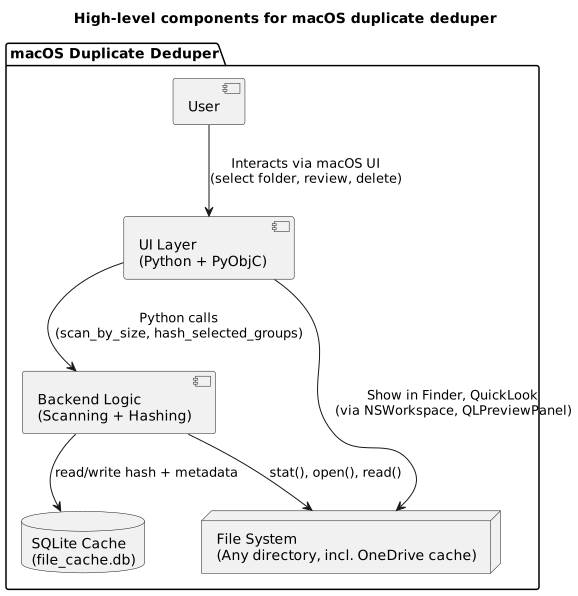
The system consists of three major layers:
- UI Layer (PyObjC): Directory picker, size-based candidate review, hash-based duplicate review, QuickLook previews, Finder integration, and status indicators.
- Backend Logic (Python): Fast size-based scanning, targeted hashing, SQLite-backed caching, and file metadata extraction.
- File System + SQLite Cache: Persistent hash storage to avoid re-hashing unchanged files and support incremental rescans.
3. Backend Architecture
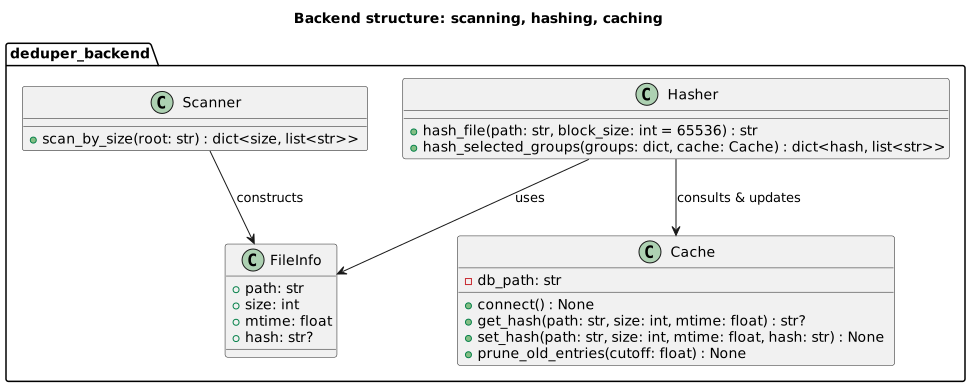
The backend is intentionally modular:
- Scanner performs a fast directory walk and groups files by size.
- Hasher computes SHA256 hashes only for user‐selected files.
- Cache stores file metadata and hashes to avoid re-computation.
- File Info is a lightweight representation of a file’s metadata.
4. SQLite Cache Schema
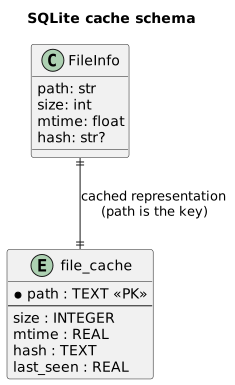
The cache stores file metadata and hashes keyed by path. This enables incremental rescans and avoids hashing unchanged files.
5. UI Architecture
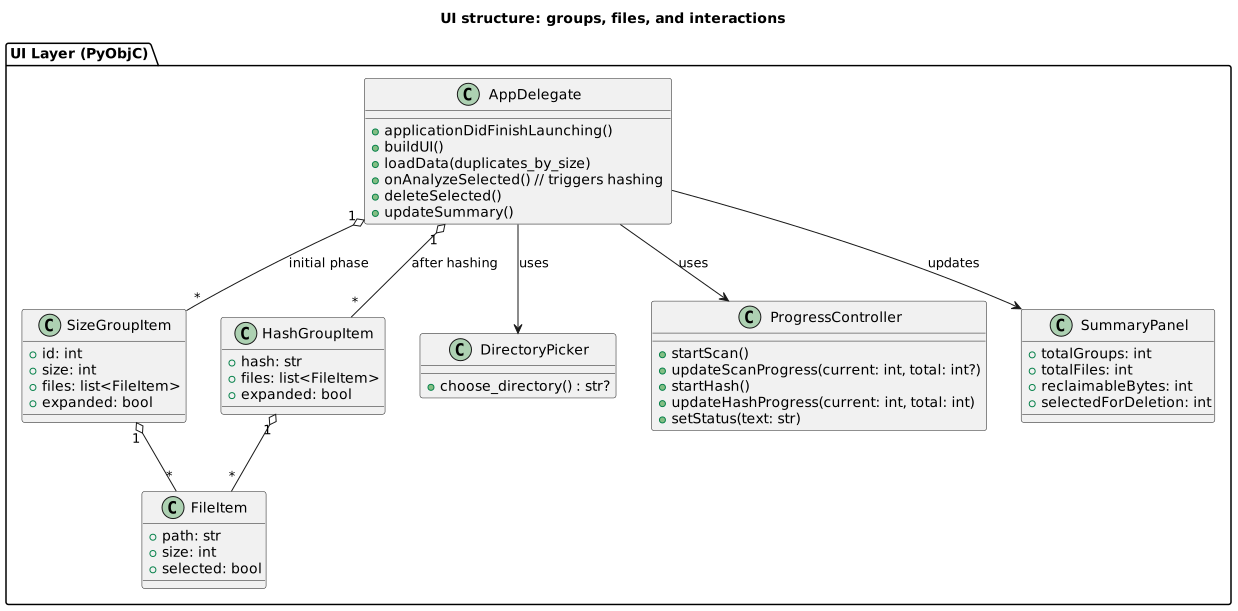
The UI is built around an NSOutlineView that displays:
- Size-based groups (Stage 1)
- Hash-based duplicate groups (Stage 2)
Each group contains FileItem objects with checkbox state, path, size, and QuickLook preview support.
6. End-to-End Flow
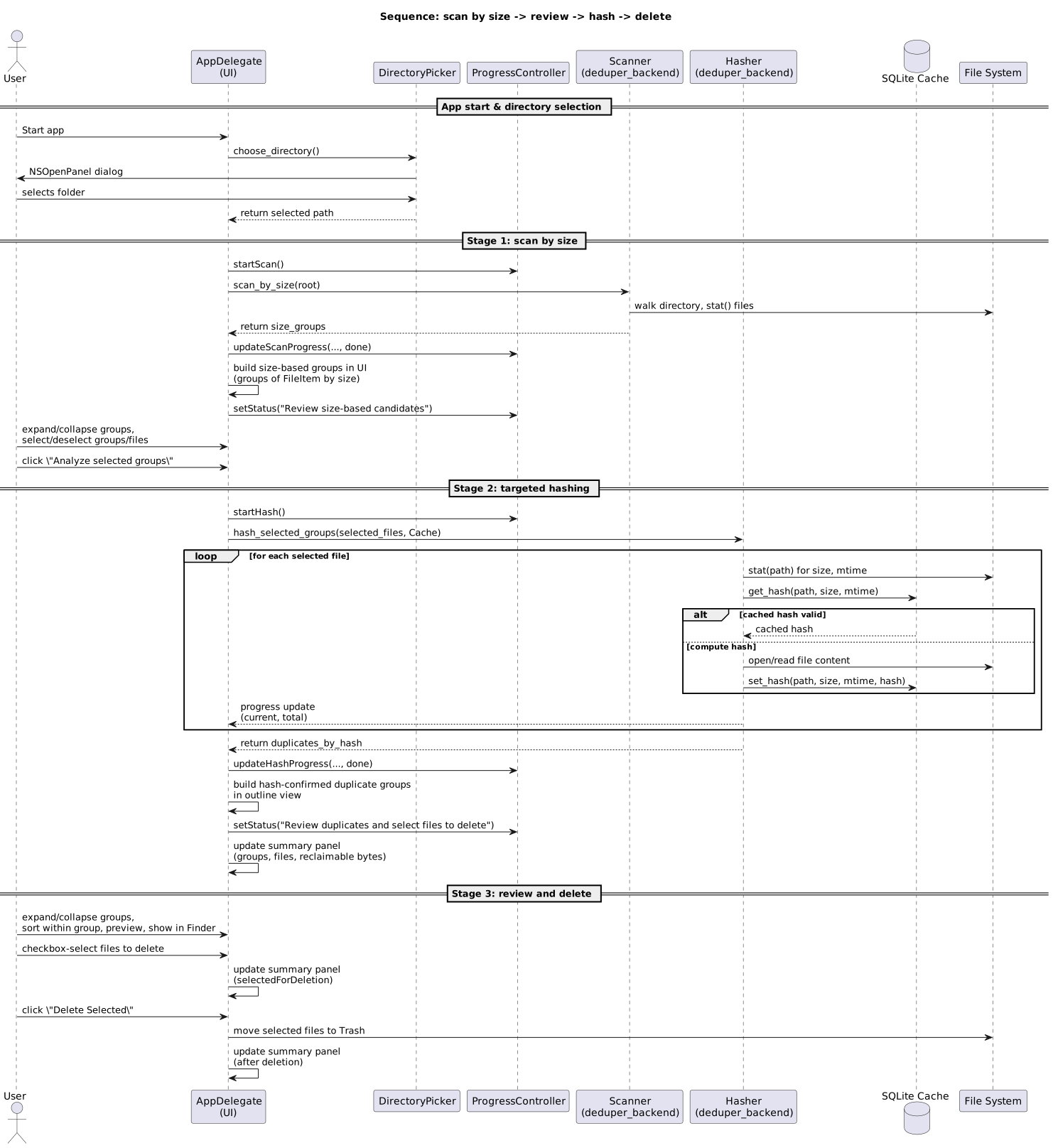
The following sequence diagram captures the entire lifecycle: Directory selection, size-based scan, user review, targeted hashing, duplicate confirmation, and finally deletion.
7. Packaging Considerations
Notarized App (recommended first step)
- Bundle Python + PyObjC
- Sign with Developer ID
- Notarize with Apple
- Gatekeeper-friendly, no sandbox restrictions
Mac App Store (possible, but more work)
- Must be sandboxed
- Must use security-scoped bookmarks
- Must embed Python interpreter correctly
- Must pass App Store review
This architecture is compatible with both, but the App Store path requires additional constraints.
8. Conclusion
This architecture provides:
- A clean separation between UI, backend, and caching.
- Deterministic, user-controlled duplicate detection.
- Efficient rescans via SQLite caching.
- A native macOS experience through PyObjC.
- A clear path toward packaging and notarization.